 TAP ZAP
The shortlist, by need
These are recommendations for different jobs, rather than an overall score or a laboratory ranking.
Windows Night light
Included with Windows 10 and 11
Built-in warmth strength, sunset scheduling, and custom hours
LightBulb
Free; source available under MIT license
Gamma transitions, manual or solar schedules, app whitelist, and hotkeys
f.lux
Free for personal use
Time-of-day color transitions, app exclusions, and special color modes
f.lux product page · f.lux FAQ and licensing · f.lux Windows features · f.lux Mac guide
Iris
Pro $14.99; subscription $1.99/month
Color and software brightness controls with many modes and advanced options
Iris product page · Iris pricing and license terms · Iris external-monitor guide
Tap Zap
$39 USD one-time
Warmth, software brightness, and DAY / EVENING / NIGHT presets
Tap Zap product page · Tap Zap FAQ · Tap Zap downloads · Tap Zap refund policy
Choose the missing Windows capability
A paid tool should solve a concrete task your free setup leaves unresolved. The table is a decision aid based on documentation, not a measured speed, health or compatibility ranking.
| Requirement | First candidates | Decision test |
|---|---|---|
| Basic scheduled warmth | Windows Night light | Strength and custom hours work on this driver. |
| Per-app ordinary colors and hotkeys | LightBulb; f.lux | Correct executable disables and resumes the filter. |
| Advanced tools or a USB-display path | Iris | The needed tool/edition and its recommended Windows API work. |
| Separate image dimming and named presets | Tap Zap; Iris | Readable text, dark detail and reliable off-state. |
| HDR, protected video or exclusive fullscreen | Exact-setup testing | Desktop success does not establish these paths. |
Run the included option before installing an app
Go to Settings → System → Display → Night light. Compare on/off, Strength and Schedule. Microsoft documents sunset-to-sunrise and custom hours, and says some drivers, including DisplayLink and Basic Display, do not support it. Identify the display adapter before trying to solve an unavailable toggle by changing warmth preferences. Microsoft display instructions
The Night light comparison explains the separate-dimming purchase decision. If Night light is enough, there is no reason to replace it. If it is missing a feature, the Windows alternatives shortlist offers several relevant candidates.
Prefer a free exclusion workflow when that is the requirement
LightBulb documents a whitelist, configurable transitions, schedules and hotkeys. f.lux provides app disabling and additional modes on Windows. In either app, test the actual process you use; a launcher and its game may be different executables. Check for shortcuts already taken by your IDE or game. LightBulb controls f.lux Windows controls
Read Tap Zap vs LightBulb for manual presets versus customization, and Tap Zap vs f.lux for dimming and red modes. Neither free app should be dismissed as only a yellow tint.
Understand what paid dimming adds
Tap Zap’s tray panel has WARMTH, BRIGHTNESS and DAY / EVENING / NIGHT. Its default Windows renderer applies a color matrix; Legacy Mode uses gamma ramps. Hold hardware brightness fixed while testing image dimming. Iris offers a broader toolkit and documents a Windows high-level API for certain external-monitor issues. Iris tools External displays
The Iris comparison separates license and tool choices. The software-dimming explanation covers PWM and tonal limits. Tap Zap costs $39 USD one-time for three devices and lifetime updates, with no free Windows trial and a 30-day refund policy; that expense should buy a useful working workflow.
Build a Windows test record before blaming the app
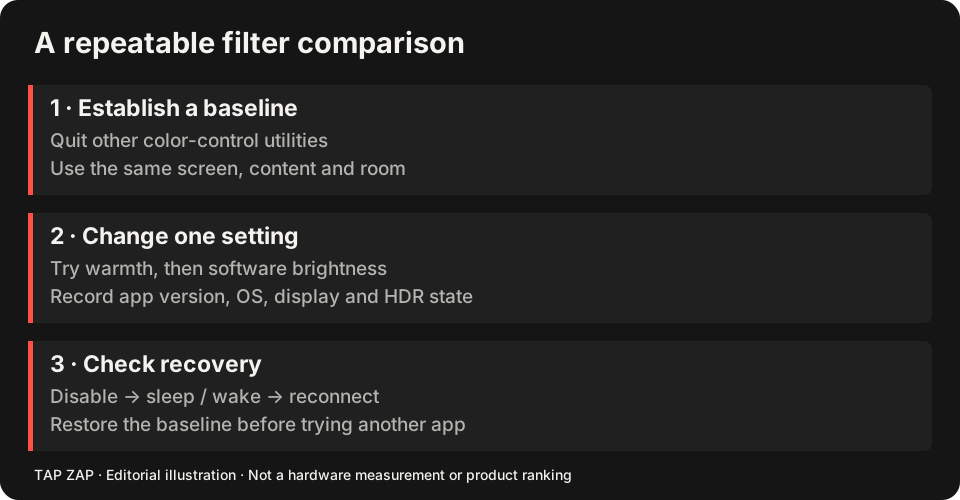
Record Windows build, app version, GPU/driver, display model, refresh rate, connection, HDR and automatic/adaptive brightness state. We have not established a controlled game/GPU/HDR compatibility matrix for this article.
Use the multi-monitor record format for a dock, and the gaming-settings guide for fullscreen checks.
- Turn Night light off and quit all other color filters.
- Check a light document and a gray ramp on each display.
- Verify disable/OFF and Quit before and after sleep/wake.
- Test required protected video or fullscreen apps separately; restore the known working setup if they fail.
Sources and scope
Researched on 3 October 2026 using official product pages and documentation. Tap Zap’s maintained source was also checked for its controls and known compatibility limits. We did not conduct controlled hardware, medical, or performance tests for this article. Prices and features can change; confirm current terms before purchase.
- f.lux FAQ and licensing
- f.lux product page
- f.lux Mac guide
- f.lux Windows features
- Iris external-monitor guide
- Iris pricing and license terms
- Iris product page
- LightBulb features and releases
- LightBulb MIT license
- Microsoft Night light and display guide
- Tap Zap downloads
- Tap Zap FAQ
- Tap Zap product page
- Tap Zap refund policy
Known Tap Zap limitation: some M5 Pro/Max configurations remain unresolved. Mac/Windows has no free trial; see the FAQ and refund policy. The Linux edition is a separate free experimental beta.
See Tap Zap on your setup.
Check requirements and installation details before choosing the paid Mac/Windows edition. A free option may cover everything you need.