 TAP ZAP
At a glance
| Decision | Tap Zap | Iris |
|---|---|---|
| Listed cost | $39 USD one-time | Pro $14.99; subscription $1.99/month |
| License details | Three devices per license and lifetime updates. No free Mac/Windows trial; a 30-day refund policy applies. Localized checkout prices and taxes may differ. | Iris mini Pro is $9.99. One-time Pro licenses cover one device at a time; minor builds and bug fixes are included, but program updates are excluded. The subscription includes future versions. A free version is listed. |
| Platform | macOS 12+ and Windows 10+; separate free Linux beta | Windows, macOS, and Linux downloads are listed |
| Main controls | Warmth, software brightness, and DAY / EVENING / NIGHT presets | Color and software brightness controls with many modes and advanced options |
| Best fit | A compact interface for manual warmth and dimming across Mac and Windows | People who want a larger set of adjustment tools |
| Official sources | Tap Zap product page · Tap Zap FAQ · Tap Zap downloads · Tap Zap refund policy | Iris product page · Iris pricing and license terms · Iris external-monitor guide |
Iris has a broader adjustment toolkit
Iris lists automatic color and brightness changes, manual controls, color effects, font rendering, magnification, and overlay-based adjustments. Its product page acknowledges that the range of options can require more learning. That feature breadth can be a real advantage if you want to tune beyond a few presets. Iris product overview
Tap Zap concentrates its everyday interface around warmth, software brightness, and three named presets. We recommend evaluating that simpler workflow when you do not need the extra Iris tools. Simplicity is a preference; it is not proof of better filtering or better health outcomes.
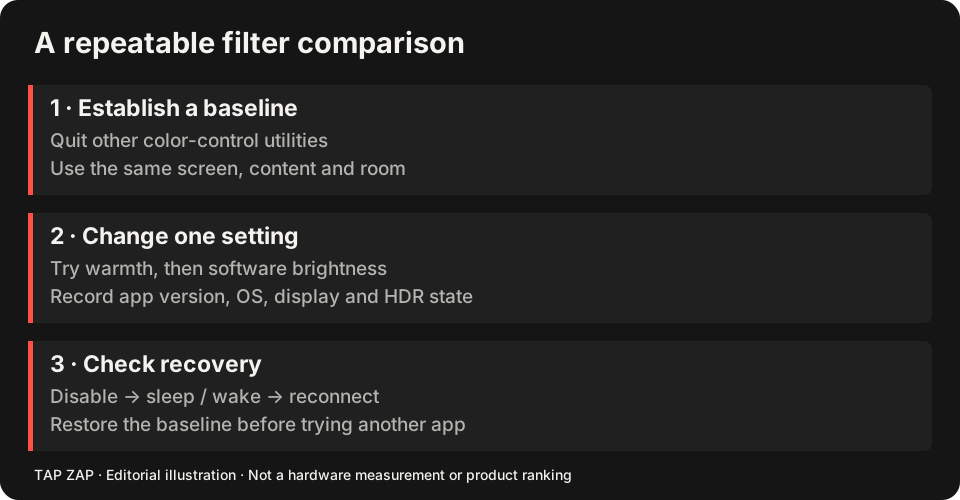
Compare equivalent adjustments before counting features
First create a modest warm, dim reading setup in Iris using the edition you are considering. Note which settings require Pro and which monitor path is selected. Then attempt the same visible reading task in Tap Zap with EVENING and BRIGHTNESS. Compare access to the settings you use daily, rather than counting all listed modes as benefits.
For example, a buyer who needs magnification or font-rendering tools should investigate Iris’s documented toolkit; Tap Zap’s main panel is not a substitute for those features. A buyer who wants only warmth and dimming across a Mac and a Windows PC may prefer Tap Zap’s three-device package. Iris Pro’s lower one-device price is meaningful even when Tap Zap’s multi-device terms are useful. Iris feature scope Edition and update terms
If an external Windows USB display is the issue, test the API Iris recommends before changing products. Its high-level API guidance is Windows-specific and cannot be transferred to its Mac edition. See the display-path checklist and the technical explanation of image transforms. Iris external-monitor guidance
Price: Iris can be the cheaper choice
The Iris pricing page lists mini Pro at $9.99, Pro at $14.99, and a $1.99 monthly subscription. One-time Pro options cover one device at a time and exclude program updates while including minor builds and bug fixes. The subscription includes future versions. Iris license options
For one computer, Iris Pro has a lower upfront cost than Tap Zap’s one-time license. Tap Zap covers three devices with lifetime updates, so the packages differ. Compare the actual edition, update rights, and number of devices you need; do not turn unlike licenses into a blanket “cheaper forever” claim.
Docks and USB displays deserve a separate test
Iris documents a Windows High-level API for some USB-connected monitor cases. Its monitor guide also says that route is not available on macOS or Linux. This is a meaningful feature to investigate for a Windows dock setup, with platform limits. Iris external-monitor guide
We have not verified that Tap Zap can replace that route on every dock or graphics driver. If Iris already works on a difficult Windows display path, that is a reason to keep it. Test each monitor directly and record the cable, adapter, GPU, and driver before drawing a conclusion.
Software dimming is not an optical certification
Iris markets brightness control without PWM. Tap Zap also offers software dimming intended to reduce reliance on hardware brightness adjustment. The shared approach does not establish that either app eliminates temporal modulation on every LCD or OLED.
This article compares documented capabilities and licensing, not measured panel output. Hardware brightness, display technology, HDR, and driver behavior can change the result. Use exact-display measurements for claims about flicker, and choose whichever workflow visibly works and restores your settings reliably.
Keep a return path while comparing
Record the Iris edition, essential tools, API selection and every monitor that currently works. Test those essential jobs before switching. The Iris alternatives guide separates feature loss, monitor paths and the wider free shortlist.
- Recreate the actual reading/adjustment task with one active filter.
- Test the external display or advanced tool that justified Iris; a missing essential feature is a failed replacement.
- Verify ordinary colors with OFF and Quit, then after sleep/wake. Return to Iris if the required path fails.
Sources and scope
Researched on 3 October 2026 using official product pages and documentation. Tap Zap’s maintained source was also checked for its controls and known compatibility limits. We did not conduct controlled hardware, medical, or performance tests for this article. Prices and features can change; confirm current terms before purchase.
- Iris external-monitor guide
- Iris pricing and license terms
- Iris product page
- Tap Zap downloads
- Tap Zap FAQ
- Tap Zap product page
- Tap Zap refund policy
Known Tap Zap limitation: some M5 Pro/Max configurations remain unresolved. Mac/Windows has no free trial; see the FAQ and refund policy. The Linux edition is a separate free experimental beta.
See Tap Zap on your setup.
Check requirements and installation details before choosing the paid Mac/Windows edition. A free option may cover everything you need.