 TAP ZAP
The shortlist, by need
These are recommendations for different jobs, rather than an overall score or a laboratory ranking.
Apple Night Shift
Included with supported Macs
Built-in warmth adjustment with manual and scheduled activation
f.lux
Free for personal use
Time-of-day color transitions, app exclusions, and special color modes
f.lux product page · f.lux FAQ and licensing · f.lux Windows features · f.lux Mac guide
Iris
Pro $14.99; subscription $1.99/month
Color and software brightness controls with many modes and advanced options
Iris product page · Iris pricing and license terms · Iris external-monitor guide
Tap Zap
$39 USD one-time
Warmth, software brightness, and DAY / EVENING / NIGHT presets
Tap Zap product page · Tap Zap FAQ · Tap Zap downloads · Tap Zap refund policy
Choose the Mac control for the job
These recommendations compare documented capabilities and costs, not measured health benefits or an overall laboratory winner. Warmth, image brightness and the panel’s physical light behavior are separate questions.
| Your job | Start with | What to check next |
|---|---|---|
| Warmer desktop during set hours | Night Shift | Warmth range, supported external displays and ordinary colors after off. |
| Normal colors automatically in an editor | f.lux | Disable for current app, then enter and leave the editor. |
| More effects or adjustment tools | Iris | Exact Mac edition, the tool you need and license/update terms. |
| Named presets plus separate image dimming | Tap Zap | Readability, dark-tone separation, OFF and sleep/wake on your displays. |
| Affected M5 Pro/Max or an unresponsive docked display | A known working setup | Compatibility is unresolved/unknown until the exact path visibly works. |
First run: see whether Night Shift is already sufficient
Open Apple menu → System Settings → Displays → Night Shift. Turn it on manually and compare the warmth slider using a white document, colored annotations and a photograph. Try a custom schedule or sunset schedule, then switch it off. Brightness keys and the monitor menu remain separate controls. Apple’s Night Shift instructions
If this is all you need, keep it. The Night Shift vs Tap Zap comparison shows the extra paid task: dimming the image independently of hardware brightness and moving between named presets. The Mac alternatives guide compares several replacements when Apple’s control falls short.
Choose f.lux for exclusions; compare Iris for a larger toolkit
f.lux’s Mac guide documents location, wake time, temporary disable, current-app disable and Darkroom. Test an app exclusion in the actual editor you use, including when you switch back to your browser. If a free exclusion solves your interruption, a manual on/off workflow may be a step backward. f.lux Mac controls
Iris lists more adjustment options, including brightness and effects; verify the Mac edition rather than assuming Windows display-API guidance applies. The f.lux comparison and Iris comparison explain the corresponding TAP ZAP tradeoffs. No controlled side-by-side performance or optical ranking is claimed here. Iris tools Platform limits
Evaluate Tap Zap with hardware brightness held constant
Open the bolt in the menu bar, select EVENING, then move BRIGHTNESS with your hardware setting unchanged. Check whether text remains clear and neighboring dark shades remain distinguishable. Toggle ZAP off to return to ordinary appearance; DAY is a warm preset, not the off state.
Tap Zap is $39 USD one-time for three devices with lifetime updates; no free Mac/Windows trial is offered, and the 30-day refund policy applies. Some M5 Pro/Max configurations remain unresolved. Affected users should not purchase on the assumption of a confirmed fix. Software-dimming tradeoffs explain why a darker image does not certify a flicker-free panel. Refund terms
Record a Mac baseline you can reproduce
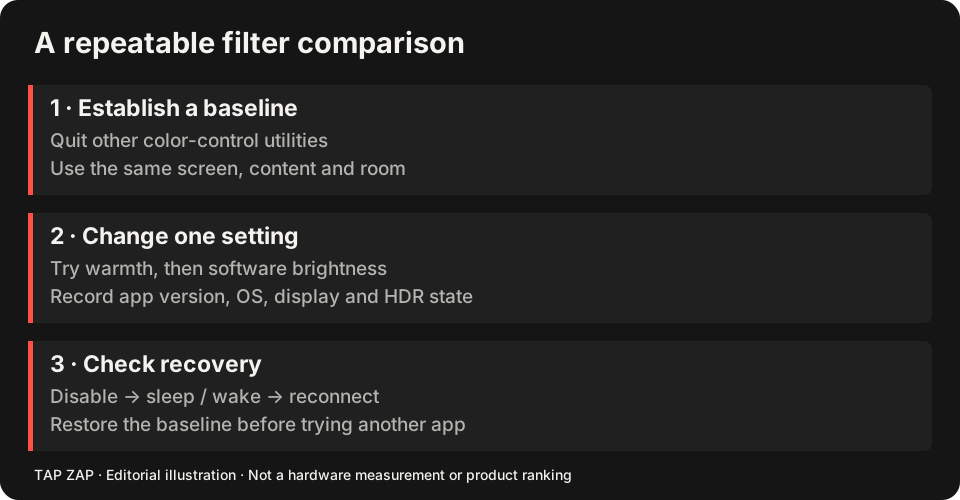
Write down Mac model/chip, macOS build, app version, active profile, HDR/reference mode, automatic brightness and True Tone state. Test the built-in screen and each external connection separately. A screenshot documents controls and image values; it does not measure emitted spectrum or flicker.
The multi-monitor guide provides a record format for direct and docked paths. Use the transfer-table reference when an app reports success but the display does not visibly respond.
- Disable Night Shift and quit competing filters before each third-party test.
- Check the document, annotations and a gray ramp with one modest setting.
- Toggle ZAP or the app’s disable control, then Quit; confirm restoration.
- Repeat after sleep/wake and normal dock reconnection. Keep the working free setup if paid controls add no reliable value.
Sources and scope
Researched on 3 October 2026 using official product pages and documentation. Tap Zap’s maintained source was also checked for its controls and known compatibility limits. We did not conduct controlled hardware, medical, or performance tests for this article. Prices and features can change; confirm current terms before purchase.
- f.lux FAQ and licensing
- f.lux product page
- f.lux Mac guide
- f.lux Windows features
- Iris external-monitor guide
- Iris pricing and license terms
- Iris product page
- Apple Night Shift guide
- Tap Zap downloads
- Tap Zap FAQ
- Tap Zap product page
- Tap Zap refund policy
Known Tap Zap limitation: some M5 Pro/Max configurations remain unresolved. Mac/Windows has no free trial; see the FAQ and refund policy. The Linux edition is a separate free experimental beta.
See Tap Zap on your setup.
Check requirements and installation details before choosing the paid Mac/Windows edition. A free option may cover everything you need.