 TAP ZAP
At a glance
| Decision | Tap Zap | Windows Night light |
|---|---|---|
| Listed cost | $39 USD one-time | Included with Windows 10 and 11 |
| License details | Three devices per license and lifetime updates. No free Mac/Windows trial; a 30-day refund policy applies. Localized checkout prices and taxes may differ. | There is no separate app purchase. Microsoft says Night light is unavailable with certain drivers, including DisplayLink and Basic Display. |
| Platform | macOS 12+ and Windows 10+; separate free Linux beta | Windows 10 and 11, subject to display-driver support |
| Main controls | Warmth, software brightness, and DAY / EVENING / NIGHT presets | Built-in warmth strength, sunset scheduling, and custom hours |
| Best fit | A compact interface for manual warmth and dimming across Mac and Windows | Windows users who need basic warmth without an installation |
| Official sources | Tap Zap product page · Tap Zap FAQ · Tap Zap downloads · Tap Zap refund policy | Microsoft Night light and display guide |
Built-in controls cover the basic job
Microsoft documents Night light’s on/off control, strength slider, sunset-to-sunrise schedule, and custom hours. These features are enough for many people who just want their Windows desktop to look warmer in the evening. Microsoft’s Night light guide
Tap Zap offers warmth and software brightness in its own control panel with DAY, EVENING, and NIGHT presets. Evaluate it if those controls make repeated adjustments easier. The default recommendation for basic warmth remains the option already in Windows.
Try the Windows task before buying a second control
Open Settings → System → Display → Night light. Turn it on, move Strength and choose sunset or custom hours. With the same document visible, adjust hardware brightness separately. If that produces the appearance and schedule you want, there is no extra app cost or installation to justify. Microsoft notes driver limitations, including DisplayLink and Basic Display. Windows settings and limits
With Night light off, test Tap Zap’s EVENING preset and separate BRIGHTNESS slider from the tray panel. Its default Windows path applies a full-screen color matrix; Legacy Mode uses gamma ramps. A setting that works on the desktop can still behave differently with HDR, protected video or an exclusive-fullscreen app. No tested GPU/HDR matrix is established by this article.
The added value is control over image dimming and named presets, if those controls work reliably on your system. Follow the Windows decision guide and the two-brightness-control check; a successful API result alone is not physical display proof.
Separate picture dimming from hardware brightness
Microsoft’s display guide treats brightness and Night light as separate settings. It also notes that external-monitor brightness may need the monitor’s own buttons. Tap Zap’s software dimming changes the displayed picture, which can be useful when a hardware slider or monitor minimum is inconvenient. Brightness and external-monitor controls
Software dimming can change contrast and shadow visibility. It does not certify a display as flicker-free. Test text, dark scenes, and restoration before choosing, especially if you switch between ordinary desktop work and HDR content.
Night light can lose on driver compatibility
Microsoft explicitly says Night light is unavailable with some drivers, including DisplayLink and Basic Display. That is a documented limitation, not a reason to assume every external monitor is unsupported. Record the actual driver and connection when troubleshooting. Driver caveat
If you need a documented alternative route for a Windows USB display, investigate Iris’s High-level API and f.lux’s DisplayLink guidance. We have not verified Tap Zap as a replacement on every such configuration. A paid purchase should not be sold as the cure for a driver restriction.
Cost and installation tradeoffs
Night light requires no separate app purchase. Tap Zap lists a one-time three-device license and lifetime updates, with no free Mac/Windows trial. Review the current Windows installation guidance and follow your organization’s device policy before choosing it. Windows installer details
Choose Night light when warmth is enough, f.lux or LightBulb when a free third-party feature fills the gap, and Tap Zap when its paid control workflow is worth the cost. We have not measured a performance or health advantage between these options.
Keep a return path while comparing
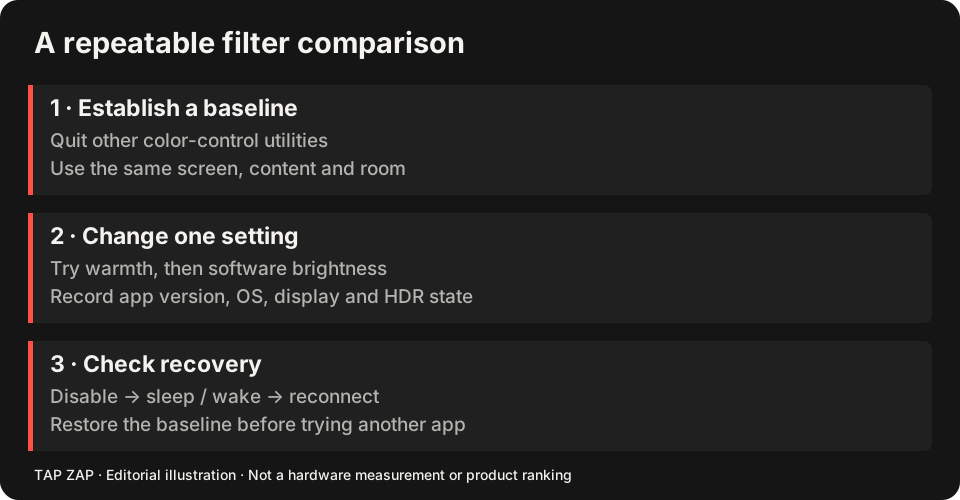
Record Night light’s strength, hours and the display adapter in use. Turn Night light off before testing one replacement. The Windows alternatives guide adds LightBulb, f.lux and Iris to the choice.
- Test the same light document with Tap Zap’s EVENING and BRIGHTNESS.
- Verify the actual external, fullscreen or HDR path you need, separately from the ordinary desktop.
- Check OFF, Quit and wake. Restore Night light if its included controls already cover the job.
Sources and scope
Researched on 3 October 2026 using official product pages and documentation. Tap Zap’s maintained source was also checked for its controls and known compatibility limits. We did not conduct controlled hardware, medical, or performance tests for this article. Prices and features can change; confirm current terms before purchase.
- Microsoft Night light and display guide
- Tap Zap downloads
- Tap Zap FAQ
- Tap Zap product page
- Tap Zap refund policy
Known Tap Zap limitation: some M5 Pro/Max configurations remain unresolved. Mac/Windows has no free trial; see the FAQ and refund policy. The Linux edition is a separate free experimental beta.
See Tap Zap on your setup.
Check requirements and installation details before choosing the paid Mac/Windows edition. A free option may cover everything you need.