 TAP ZAP
At a glance
| Decision | Tap Zap | LightBulb |
|---|---|---|
| Listed cost | $39 USD one-time | Free; source available under MIT license |
| License details | Three devices per license and lifetime updates. No free Mac/Windows trial; a 30-day refund policy applies. Localized checkout prices and taxes may differ. | The project is community funded. Stable releases are available on GitHub; community package-manager builds may lag behind them. |
| Platform | macOS 12+ and Windows 10+; separate free Linux beta | Windows desktop app |
| Main controls | Warmth, software brightness, and DAY / EVENING / NIGHT presets | Gamma transitions, manual or solar schedules, app whitelist, and hotkeys |
| Best fit | A compact interface for manual warmth and dimming across Mac and Windows | Windows users who want free customization and app exclusions |
| Official sources | Tap Zap product page · Tap Zap FAQ · Tap Zap downloads · Tap Zap refund policy | LightBulb features and releases · LightBulb MIT license |
Customization is a LightBulb strength
LightBulb documents manual and location-based sunrise/sunset times, smooth gamma transitions, global hotkeys, and a whitelist for color-sensitive apps. These are useful features if you switch between general desktop work and software that needs normal colors. LightBulb feature list
Tap Zap groups its main controls around warmth, software brightness, and three presets. That can suit people who prefer a small panel. It is not a reason to dismiss LightBulb as a basic tint slider; its public feature set is more configurable than that description suggests.
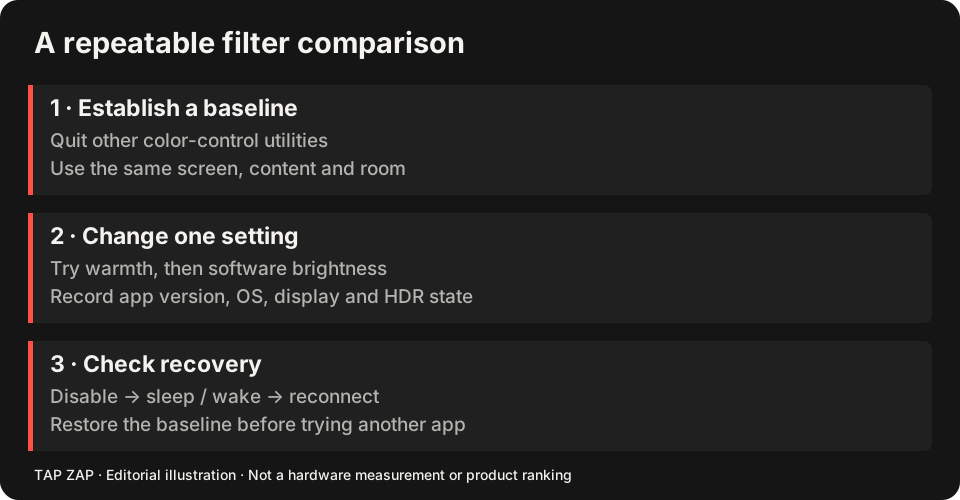
App exclusions versus manual presets: test the interruption
In LightBulb, configure a schedule and add a color-sensitive application to its whitelist. Switch into that application and back to a reading window. Also test the hotkey you intend to use, including any collision with your editor or game. Those workflow tools are good reasons to keep LightBulb. Whitelist, hotkeys and transitions
In Tap Zap, use EVENING and BRIGHTNESS for reading, then toggle ZAP off before checking color. Do not assume a LightBulb whitelist or its shortcuts transfer automatically. If automatic app exclusions are mandatory, verify them in the replacement before spending; a compact panel alone does not replace that automation.
A concrete license example is one Windows desktop plus one Mac laptop: Tap Zap’s $39 USD one-time license covers both within its three-device allowance and includes lifetime updates. LightBulb covers the Windows task for free; the Mac can use Night Shift or f.lux for free too. Paying is justified by a preferred working control workflow, not by the mere existence of a second device. See the license cost comparison and Windows guide.
Free source access versus a paid mixed-platform license
LightBulb is community funded and publishes its source under an MIT license. It provides stable Windows releases and lists community package-manager options with a warning that those packages can lag. Source access is a concrete advantage for users who want to inspect or modify the app. Distribution details License
Tap Zap’s one-time license covers three devices on its paid Mac/Windows editions and includes lifetime updates. If you only use Windows and LightBulb fits, the free option is the stronger value. If you want Tap Zap’s controls on a Mac as well as a PC, its mixed-platform package may be useful.
Evaluate dimming and exclusions in your real apps
Gamma changes interact with the display path and any other software that loads color settings. Test an app exclusion by opening the actual color-sensitive program, returning to the desktop, and checking the transition. A listed feature is not a guarantee for every full-screen game or HDR mode.
Compare Tap Zap’s manual dimming using text and dark images, and test OFF and Quit restoration. We have not timed transitions, measured frame rates, or measured optical output for either product. This comparison therefore makes no “faster,” “zero overhead,” or “flicker-free on every display” claim.
Choose on fit, not the size of the price tag
LightBulb is our recommendation when free Windows customization is the priority. Its hotkeys and whitelist can be more useful than a smaller interface. Tap Zap is worth evaluating when you prefer its particular controls and understand its compatibility limits.
There is no free Mac/Windows trial for Tap Zap. Check the download and refund details before purchasing. A successful software test still does not establish a sleep, eye-health, or physical flicker advantage. Installation details Refund terms
Keep a return path while comparing
Record the LightBulb schedule, whitelist and shortcuts before disabling it for a comparison. There is no automatic settings importer. The LightBulb alternatives guide focuses on what can replace those features.
- Try the usual reading setting in Tap Zap, then perform the task that used your whitelist or shortcut.
- Confirm manual switching is sufficient if automatic app disabling was previously important.
- Verify OFF, Quit, sleep/wake and every monitor before removing the working LightBulb setup.
Sources and scope
Researched on 3 October 2026 using official product pages and documentation. Tap Zap’s maintained source was also checked for its controls and known compatibility limits. We did not conduct controlled hardware, medical, or performance tests for this article. Prices and features can change; confirm current terms before purchase.
- LightBulb features and releases
- LightBulb MIT license
- Tap Zap downloads
- Tap Zap FAQ
- Tap Zap product page
- Tap Zap refund policy
Known Tap Zap limitation: some M5 Pro/Max configurations remain unresolved. Mac/Windows has no free trial; see the FAQ and refund policy. The Linux edition is a separate free experimental beta.
See Tap Zap on your setup.
Check requirements and installation details before choosing the paid Mac/Windows edition. A free option may cover everything you need.