 TAP ZAP
Choose an alternative by need
| Option | Choose it when | Tradeoff to check |
|---|---|---|
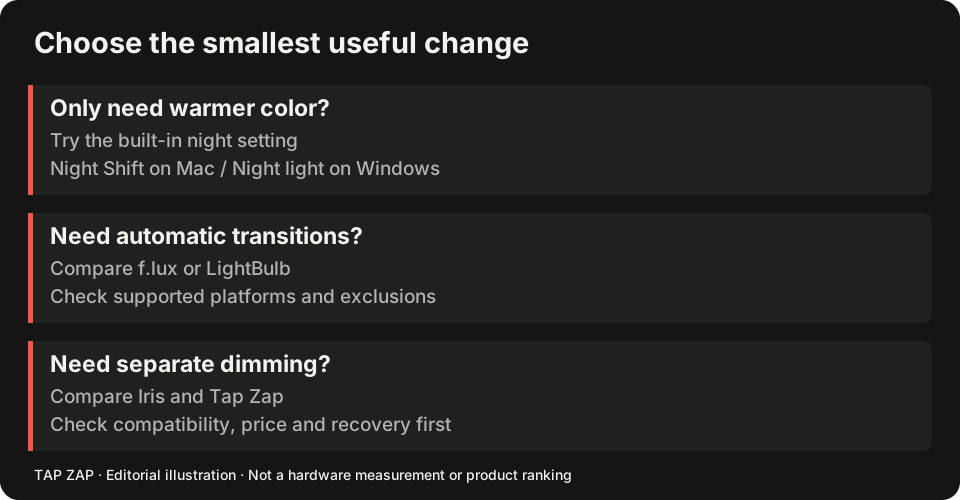
| Apple Night Shift Supported Macs on macOS Sierra 10.12.4 or later | Mac: built-in scheduled warmth | Less configurable than f.lux; no separate software-brightness slider. |
| Windows Night light Windows 10 and 11, subject to display-driver support | Windows: built-in warmth and custom hours | Driver limits apply; no independent software dimming. |
| LightBulb Windows desktop app | Windows: free whitelist, hotkeys and transitions | Windows only; recreate exclusions and shortcuts. |
| Iris Windows, macOS, and Linux downloads are listed | Mac/Windows: broader color and adjustment toolkit | Check the edition, update terms and display API; costs vary. |
| Tap Zap macOS 12+ and Windows 10+; separate free Linux beta | Mac/Windows: named warmth presets and separate image dimming | Paid; no free desktop trial; do not assume f.lux app exclusions transfer. |
Mac replacements: start with what you would lose
Night Shift is the easiest change when you want a warm evening desktop without another installed utility. f.lux’s wake-time model, current-app disabling and Darkroom are reasons you might prefer to stay. If those controls matter, moving to built-in warmth is a simplification with a cost in features. Night Shift f.lux Mac features
Iris and Tap Zap both deserve a look when software brightness is the missing control. Compare Iris’s adjustment tools and license terms with Tap Zap’s presets; neither is automatically better for your monitor. Use the Mac pillar guide and the focused Tap Zap–f.lux comparison for the two-product details.
Windows replacements: choose around exclusions and the display path
LightBulb is the closest free shortlist choice here for a Windows user who values a whitelist, hotkeys and adjustable transitions. Windows Night light is the simpler built-in route when strength and custom hours are enough. Iris adds advanced tools and documents a Windows high-level API for certain external-monitor problems. LightBulb features Night light limits Iris monitor guidance
Tap Zap adds its compact controls and a Mac/Windows license. Its default matrix and optional Legacy gamma path still require your own compatibility check. If your reason for leaving f.lux is a dock or HDR issue, use the connection-by-connection checklist rather than assuming every replacement avoids it.
A feature-loss test before uninstalling
Write down the exact thing f.lux currently does for you. A red mode alone is not a reason to switch: f.lux documents Darkroom, and Windows has dimming controls. Numeric warmth values need not produce matching output in different apps. f.lux dimming and color options
- Record location, wake time, exclusions, color effects and startup behavior.
- Disable f.lux and quit it; confirm ordinary colors before testing one replacement.
- Recreate one normal day and one color-sensitive task. Check every required exclusion.
- Test sleep/wake, OFF and Quit on each monitor. Keep f.lux if the replacement fails the missing-capability test.
Sources and scope
Researched on 3 October 2026 using official product pages and documentation. Tap Zap’s maintained source was also checked for its controls and known compatibility limits. We did not conduct controlled hardware, medical, or performance tests for this article. Prices and features can change; confirm current terms before purchase.
- f.lux FAQ and licensing
- f.lux product page
- f.lux Mac guide
- f.lux Windows features
- Iris external-monitor guide
- Iris pricing and license terms
- Iris product page
- LightBulb features and releases
- LightBulb MIT license
- Microsoft Night light and display guide
- Apple Night Shift guide
- Tap Zap downloads
- Tap Zap FAQ
- Tap Zap product page
- Tap Zap refund policy
Known Tap Zap limitation: some M5 Pro/Max configurations remain unresolved. Mac/Windows has no free trial; see the FAQ and refund policy. The Linux edition is a separate free experimental beta.
See Tap Zap on your setup.
Check requirements and installation details before choosing the paid Mac/Windows edition. A free option may cover everything you need.